Visual Workflow Editor
Build complex workflows visually
Connect AI agents, API integrations, and conditional logic into production-ready pipelines — all from a drag-and-drop canvas.
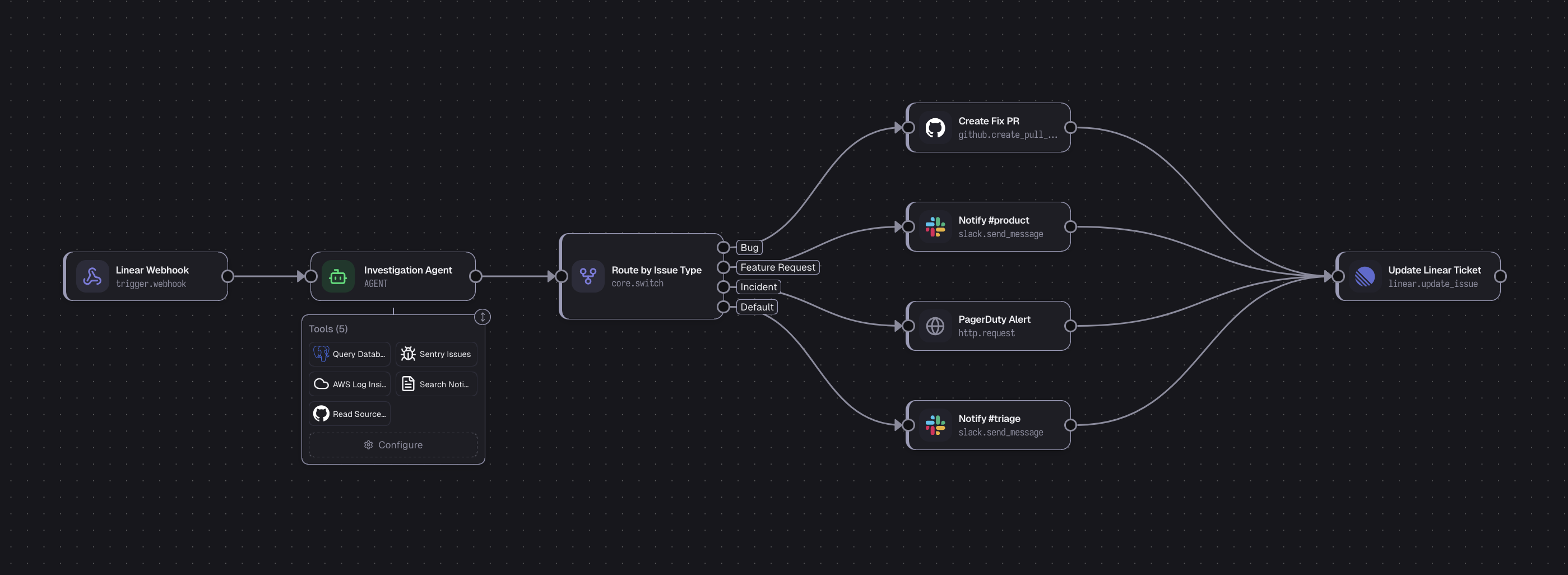
Why Flowlib
An open-source workflow engine embedded in your app
It's a library, not a platform
You npm install it into your Express, NestJS, or Next.js app. It uses your database, your auth, your deployment pipeline. No separate server to maintain, no vendor lock-in, no outgrowing the tool.
// Your existing Express app
import { createFlowlibRouter } from '@flowlib/express';

// Mount alongside your existing routes
app.use('/api', yourRouter);
app.use('/workflows', await createFlowlibRouter(...));

// that's it
Not another LangChain wrapper
Flowlib has a custom-built execution engine from the ground up.
- Smart branching — inactive paths and their downstream nodes are skipped
- Upstream outputs auto-aggregated by node name into downstream inputs
- Full JavaScript expressions in config params via QuickJS WASM sandbox
Process {{ fetch_users.filter(u => u.active).length }} users in {{ get_config.env }}Native batch processing
Flows automatically pause for OpenAI and Anthropic batch jobs, then resume when results arrive. Batch APIs are 50% cheaper — and no other flow builder handles this natively.
Learn about batch processing →Flows as code, synced to GitHub
Define workflows as readable .flow.ts files with the Builder SDK, then sync them to GitHub. Push changes directly, open a pull request on publish, or pull reviewed edits back into the visual editor.
- Write typed flows with
defineFlow(...)and SDK node helpers - Sync readable
.flow.tsfiles to GitHub with push or pull - Use PR-based publishing for reviewable, auditable workflow changes
import { defineFlow, input, model, output } from '@flowlib/core/sdk';

export default defineFlow({
  name: 'Support triage',
  nodes: [
    input('ticket', {
      variableName: 'ticket',
    }),
    model('classify', {
      credentialId: '{{env.OPENAI_CREDENTIAL}}',
      model: 'gpt-5-mini',
      prompt: 'Classify {{ ticket.title }} ...',
    }),
    output('result', {
      outputName: 'classification',
      outputValue: '{{ classify }}',
    }),
  ],
  edges: [['ticket', 'classify'], ['classify', 'result']],
});
Start building workflows today
Flowlib is free, open-source. Add it to your project in minutes.